


Google Ads Account Health Check: A Founder's Self-Audit

Updated: 16 hours ago
Most founders I talk to have one of two problems with their Google Ads account. Either they've handed it to an agency and have no idea what's happening in there, so they see a dashboard full of green arrows and assume things are fine. Or they're running it themselves, spending real money every month, and quietly unsure whether any of it is working.
Here is the short answer. A Google Ads account health check comes down to five things: conversions that count real business value, brand traffic separated from non-brand, search terms reviewed regularly, Performance Max running on purpose, and spend you can tie to qualified outcomes. If you're unsure about two or more of those, your account has a fundamentals problem, and new creative or extra budget won't help until it's fixed. This is the version a founder can run without an agency or technical expertise. For the full practitioner walkthrough your team or agency should run, use my Google Ads audit checklist for 2026, which goes much deeper on structure, landing pages, bidding, and policy.
1. Why do Google Ads accounts drift out of health?
Both of those founders share the same underlying issue: nobody has looked at the fundamentals recently, and in Google Ads the fundamentals drift fast.
A Google Ads account that's been running for six months without a systematic review almost always has at least two or three of the issues below. That's no indictment of whoever is running it. Google's platform makes clean accounts harder to maintain, with automated recommendations that frequently make things worse and bidding strategies that need active oversight to work properly. The point of a health check is simple. You want to know what your problems are before you spend another month on them.
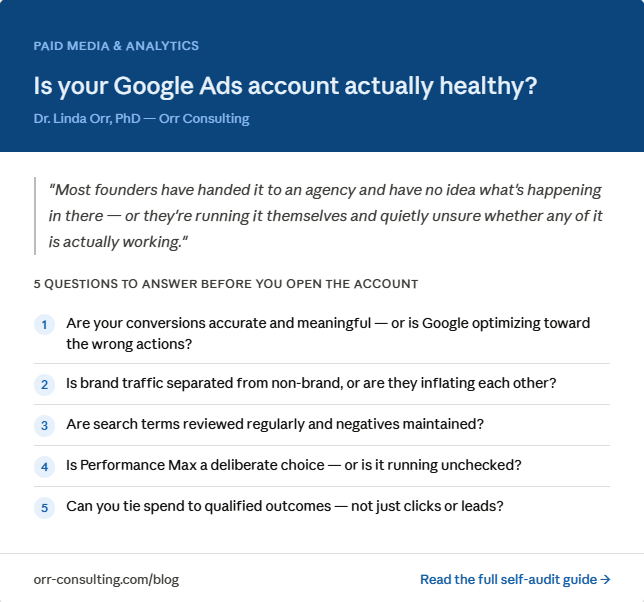
2. What five questions should you answer before you open the account?
Answer these honestly before you log in. If you can't answer them with confidence, that's the finding.
First, are your conversions accurate and meaningful? I don't mean "do we have conversions set up." I mean whether the things being counted are valuable actions. A lot of accounts count page views, session starts, or scroll depth as conversions and feed that signal into Google's bidding. Google then optimizes toward people who scroll instead of people who buy or call.
Second, is brand traffic separated from non-brand? When someone searches your company name and clicks your ad, you haven't won a new customer. That click comes at a different cost and with different intent, and mixing it in inflates your ROAS and hides what non-brand traffic is really doing. As a side note, don't pay for branded ads unless you're big enough that competitors are bidding on your brand name.
Third, are search terms reviewed regularly? Google is constantly matching your ads to queries you didn't choose. Some of those are fine. Many are irrelevant. Without regular negative keyword maintenance, you're paying for traffic that will never convert.
Fourth, is Performance Max intentional? PMax can work very well, or it can cannibalize your best search traffic and claim credit for conversions that would have happened anyway. What matters is whether you made a deliberate choice to run it, with clean conversion signals and a way to judge whether it adds incremental value. In my recent experience a well-run PMax campaign can outperform Search, but you have to know what you're doing, and many agencies don't know its intricacies.
Fifth, can you tie spend to qualified outcomes? Clicks and raw leads don't count here. I mean people who actually became customers, booked calls that showed up, or prospects who moved meaningfully through your sales process. If you can't make that connection, you're flying blind regardless of what the dashboard says.
If you answered "I'm not sure" to two or more of those, stop and fix those first. Everything else is secondary.
3. How do you check your conversion setup?
Open the conversions summary, which sits under Goals in the current Google Ads interface, and look at every conversion action being tracked.
A healthy account has one or two primary conversions that represent real business value: a purchase, a form submission that leads to a sales conversation, or a call that meets a minimum duration. Everything else is either a secondary action, tracked for insight but not used for bidding, or not tracked at all.
The warning sign is five or more conversion actions with several of them set as primary for bidding. Page views, button clicks, and time on site counted as conversions mean Google is optimizing for the wrong thing. This is one of the most common and most damaging mistakes I see in B2B and service business accounts.
4. Can you tell what each campaign is for?
Look at your campaign list and ask whether you can tell immediately what each campaign is trying to do and who it's trying to reach.
In a healthy account, campaigns are separated by intent. Brand search has its own campaign, non-brand search is broken out by service or product category, and you know what success looks like for each one.
The warning sign is one or two campaigns doing everything, with brand and non-brand mixed together and no clear logic to the structure. That makes optimization impossible, because you can't tell which part of the account is working.
5. What does your search terms report say about wasted spend?
Open the search terms report for any search campaign, set the date range to the last 30 days, and sort by cost from high to low. Look at the top 20 to 30 queries your ads actually showed for, and for each one ask a single question: would I want to pay for this click?
In a healthy account, most high-spend queries are clearly relevant. People are searching for what you actually sell, with commercial intent, and someone maintains a negative keyword list on a regular schedule.
The warning sign is showing up for competitor brand names, job searches like "Google Ads jobs," informational queries like "what is fractional CMO," or terms that have nothing to do with you. If the top-spend queries look random, the account has been left alone too long.
6. Is Performance Max adding value or stealing credit?
If you run PMax, open those campaigns and look at asset group performance and the insights. You have more visibility than you used to. In April 2025, Google announced search terms reporting and channel performance reporting for Performance Max, so you can now see far more clearly which searches and channels your PMax budget is going to.
A healthy PMax campaign shows you roughly what kinds of searches it's capturing, it isn't duplicating your brand search traffic, and your best search campaigns haven't declined since it launched.
The warning signs are that you can't tell what PMax is doing, your brand search impression share has dropped since PMax started, or overall conversions look flat or up while revenue hasn't moved. That's the "PMax is stealing credit" pattern, and it's extremely common.
7. Does your bidding strategy match your conversion volume?
Check the bidding strategy on each campaign. In a healthy account, the strategy matches the conversion volume. Target CPA or Target ROAS only makes sense when Google has enough conversions to learn from, and my rule of thumb is 30 to 50 per month per campaign at minimum. Campaigns with lower volume belong on Maximize Conversions or manual CPC until they build data.
The warning sign is an aggressive Target ROAS on a campaign getting 5 conversions a month. Google can't learn on that volume, so the algorithm is guessing. A surprising number of accounts with "smart" bidding strategies are stuck in what amounts to permanent learning mode and never optimize properly.
8. What should you fix first?
If you found two or three of the warning signs above, the problem sits in your fundamentals. Creative, landing pages, and budget level won't matter until those are right. Here's the order I use.
Fix tracking first, always. You can't make good decisions on bad data, and if your conversions measure the wrong things, every optimization rests on a false signal. Fix structure second by separating brand from non-brand and giving each campaign a clear job, so you can see what's working. Clean up search terms third by adding negatives for the irrelevant queries, which is often the fastest way to reduce wasted spend.
Evaluate PMax fourth. If it's running, set up an experiment: pause it for 2 to 4 weeks and watch what happens to your real conversion metrics. If they stay flat or improve, PMax was cannibalizing. Then optimize. Once the foundation is solid, you finally have something worth optimizing.
9. When should you bring in a professional audit?
A self-audit tells you whether the account is healthy. It won't always tell you how to fix what you find, especially in tracking and PMax, where small setup mistakes compound. If you'd rather have someone do this properly and hand you a prioritized action plan, that's what my Google Ads management and audit services are for. In a first review, I usually find a long list of significant issues, not just a handful.
If what you find points beyond paid search, such as weak landing pages or reporting nobody trusts across channels, start with the broader question of whether your marketing is working before you tune a single bid.
If you want a second set of eyes on your account, you can book a free 30-minute introductory call here, and I'll tell you what looks healthy, what doesn't, and what to fix first.
Dr. Linda Orr, PhD, is the founder of Orr Consulting, a fractional CMO and marketing analytics practice serving brands from $5M to $500M in revenue. She built Upwork's first enterprise marketing mix model, covering an $88M annual media portfolio, and spent about 20 years as a marketing professor before moving fully into consulting.



Comments